DoorDash now covers food, groceries, convenience goods, and other local shopping categories. Official DoorDash image. Source
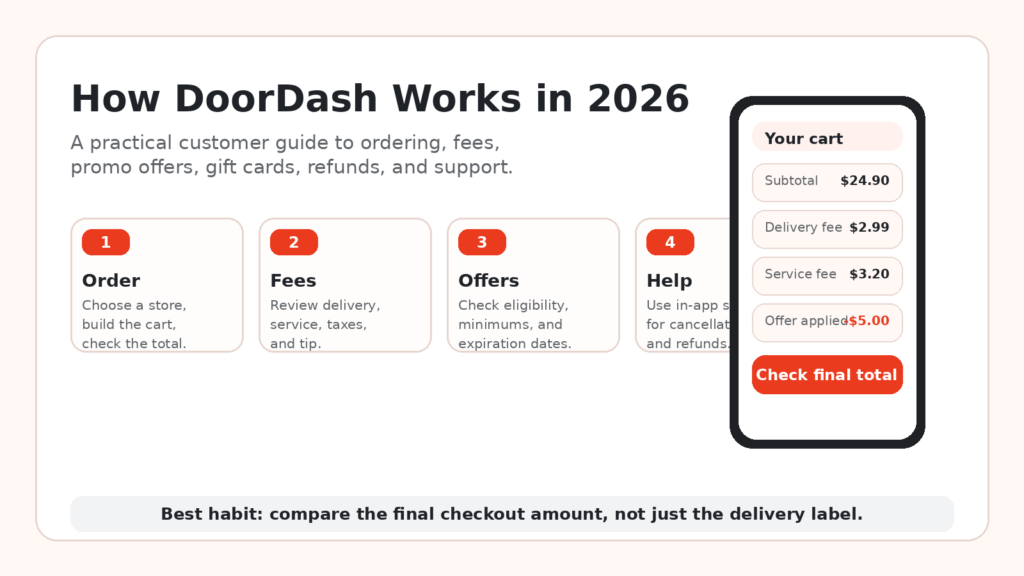
DoorDash is easy to open and surprisingly easy to misread. A restaurant may show a low delivery fee or a prominent offer, yet the amount due can still rise after the service fee, tax, tip, a small-order charge, or a difference between the app price and the merchant’s own menu.
This customer guide explains what happens from the moment you enter an address to the point where an order is delivered, canceled, or refunded. It also covers DoorDash promo offers, gift cards, DashPass, and the fastest ways to reach DoorDash customer service.
This is not a driver guide. Questions about becoming a Dasher, delivery requirements, expenses, or driver pay belong in a separate article.
| How this guide was checked We reviewed DoorDash’s current U.S. customer pages for fees, promo conditions, gift-card redemption, cancellations, refunds, DashPass pricing, and support. We also reviewed DealZenoHub’s live DoorDash store page. We did not present one national ‘average fee’ because the price shown to a customer can change by address, merchant, order size, demand, membership, and account eligibility. |
Quick Answer: How Does DoorDash Work?
Enter a delivery address, choose a nearby restaurant or store, add items to the cart, and review the full checkout breakdown. After payment, the merchant prepares the order and a Dasher usually picks it up and delivers it. The app shows order updates and provides a Help menu for cancellations, missing items, refunds, and delivery problems.
The main money rule is simple: do not judge an order by the delivery-fee label. Judge it by the final total.
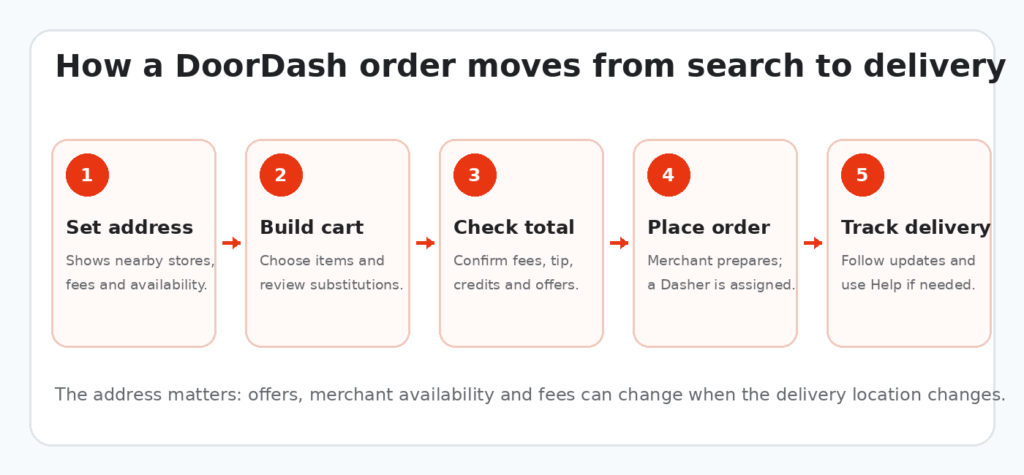
A typical DoorDash customer order in five steps.
What Is DoorDash?
DoorDash is a local delivery marketplace. Customers use its app or website to order from participating restaurants, grocery stores, convenience shops, pharmacies, pet stores, flower sellers, and other retailers available near the delivery address.
The merchant handles preparation or packing. A Dasher handles the delivery in the usual marketplace order. Pickup and scheduled delivery may also appear when the merchant and location support them.
DoorDash’s own product material shows that the service has grown well beyond restaurant meals, with separate areas for grocery, retail, and convenience shopping. See DoorDash’s app overview.
How DoorDash Works Step by Step
1. Enter the exact delivery address
The address controls which merchants appear, whether an order is in range, estimated delivery time, local fees, and many account offers. Enter apartment numbers, building names, gate instructions, and a useful drop-off note before ordering.
A different address can produce a different merchant list and a different total, even within the same city.
2. Choose a restaurant or store
Search by merchant, cuisine, item, or category. A promotional badge can help, but it should not decide the order on its own. A nearby merchant without a large offer may still be cheaper after the complete price is calculated.
3. Add items and review options
Check quantities, sizes, sides, substitutions, and special requests. Grocery orders may need replacement preferences. Restaurant customizations can add a charge, especially when the request includes a paid ingredient.
4. Read the checkout summary line by line
Before payment, check the item subtotal, delivery fee, service fee, small-order fee, taxes, tip, credits, gift-card balance, DashPass reduction, and the amount due. This is also where you should confirm that a selected offer actually changed the total.
5. Choose delivery, pickup, or a scheduled time
Pickup can remove the delivery trip, but it is not automatically free of every platform charge. Scheduled delivery is useful when available, although the order should still be checked shortly before the requested time in case the merchant changes availability.
6. Place and track the order
Once the order is accepted, the merchant begins preparation. DoorDash may then assign a Dasher. The order screen can show preparation, pickup, the driver’s route, estimated arrival, and the delivery photo.
DoorDash Fees Explained
DoorDash does not use one fixed fee for every order. Its official fee page lists several charges that may appear depending on the order and location.
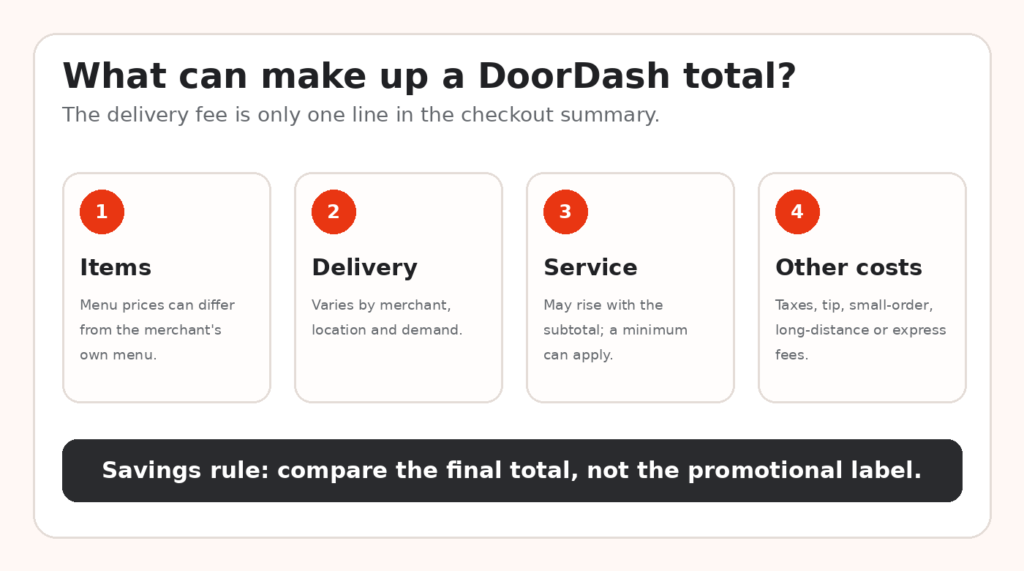
The checkout total can contain several separate costs.
Item prices
The price of an item in DoorDash can differ from the price offered directly by the merchant. This is not displayed as a separate fee, but it can matter more than a small delivery discount. Compare a few common menu items with the restaurant’s own website when the order is expensive.
DoorDash’s U.S. consumer terms explain that marketplace prices may differ from prices offered by the merchant elsewhere. Read the relevant consumer terms.
Delivery fee
The delivery fee applies to delivery orders and can vary by merchant, location, distance, demand, and other conditions. Some orders show a $0 delivery fee, but service fees, taxes, tips, and other charges may remain.
Service fee
The service fee goes to DoorDash for operating the platform. DoorDash says it may increase with the order subtotal, and a flat minimum service fee may apply to a small order.
Small-order, long-distance, and express fees
A cart below the required subtotal may receive a small-order fee. Some areas may show a long-distance or expanded-range fee when the merchant is farther away. An optional express or priority choice may add another charge where offered.
Regulatory and mandatory local fees
A city or state rule can lead to a separate regulatory response fee or another mandatory charge. These are location-specific, so a fee seen by one customer may not appear for another.
Taxes and tip
Taxes depend on the location and items. The Dasher tip is separate from the delivery and service fees. A discount on the food does not reduce the distance, weather, stairs, parking, or time involved in the delivery.
For DoorDash’s current list and descriptions, use the official fee page.
| Editor’s checkout habit Build the order first, then compare the delivered total with pickup and, when practical, the merchant’s own ordering page. Do not add an item you do not want merely to remove a smaller fee. Spending $6 to avoid a $3 charge is still spending $3 more. |
How to Save Money on DoorDash
A working promo is useful, but the best savings often come from a few small checks made before payment.
Compare complete totals
Compare the same cart, not two different meals. Look at the amount due after item prices, fees, tax, and tip. A $0 delivery label can lose to a competitor with lower menu prices or a smaller service charge.
DealZenoHub’s free-delivery restaurant guide explains why free delivery is not always the cheapest delivery.
Check pickup before paying
Pickup may save money when the merchant is close and the trip is practical. Include fuel, parking, travel time, and any pickup reward before deciding.
Avoid tiny delivery orders
Small carts are where delivery and minimum fees can take up a large share of the total. Combine planned items when it makes sense, but do not buy extras only to reach a threshold.
Enter the address before judging an offer
DoorDash offers can be limited by market, merchant, time, and account. An offer visible before an address is entered may change after the delivery location is confirmed.
Use account-specific offers and store rewards
Check the Offers area, merchant page, account email, and app notifications. Store rewards may follow their own rules and may not combine with another promotion.
Use credits and gift-card balances you already own
A forgotten balance can lower the card payment on the next eligible order. Check the Payment area before buying another gift card.
Check DealZenoHub before checkout
Visit the DoorDash coupons and deals page on DealZenoHub to review current saving methods, offer notes, and eligibility reminders. DealZenoHub does not need to publish a code string for the page to be useful; free-delivery options, membership benefits, app offers, credits, and merchant-specific deals can still lower the total.
For a wider checkout routine, see How to Save Money Shopping Online.
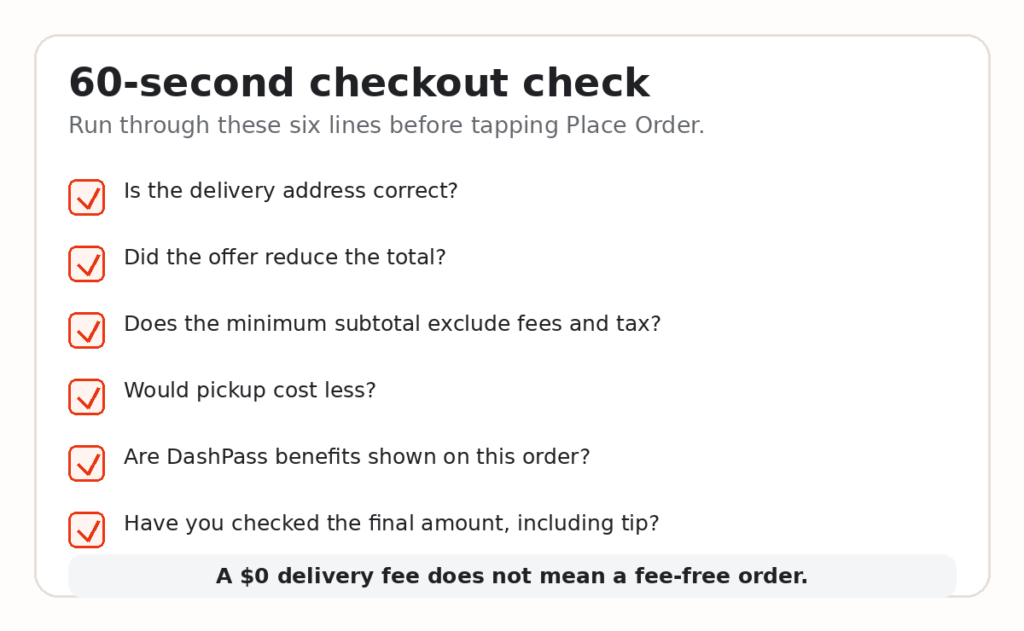
A quick check can catch an address error, a failed offer, or a total that is higher than expected.
How DoorDash Promo Codes and Offers Work
A DoorDash promo code or in-app offer can reduce the subtotal, delivery fee, or another eligible part of the order. The exact benefit depends on the terms shown with the offer.
Common formats include:
A fixed amount off an eligible subtotal
A percentage reduction with a maximum saving
A reduced or $0 delivery fee
A first-order or returning-customer offer
A merchant-specific deal
A DashPass-only offer
An offer selected automatically inside the app
How to apply an offer
1. Add eligible items to the cart.
2. Open checkout.
3. Choose the promotions, rewards, or gift-card area.
4. Enter or select the offer.
5. Wait for the price summary to update.
6. Place the order only after the discount appears in the total.
Why an offer may not work
The offer expired or reached its redemption limit.
The account is not eligible.
It is restricted to a new or returning customer group.
The subtotal does not meet the minimum.
The selected merchant, item, or order type is excluded.
The delivery address is outside the eligible area.
The offer was already used.
Another promotion or store reward is blocking it.
The offer is for pickup while the cart is set to delivery, or the reverse.
Check whether the required minimum is based on the merchandise subtotal. Fees, tax, and tip commonly do not help an order reach a promotional minimum.
DoorDash publishes separate terms for promotional offers and credits.
Can DoorDash offers be stacked?
Do not assume two promotions can be combined. Gift-card credit and an eligible promotion may work together because the gift card is a payment balance, but separate offers or store rewards can have one-per-order rules. The checkout summary is the final test.
How to Use a DoorDash Gift Card
A U.S. DoorDash gift card is redeemed into the customer’s DoorDash account as credit. DoorDash’s current U.S. gift-card terms say an account is required for redemption, gift cards do not expire, and no gift-card fee applies.
Redeem a gift card in the app
1. Sign in to DoorDash.
2. Open Account or Profile.
3. Choose Gift Card.
4. Select Redeem.
5. Enter the gift-card PIN.
6. Confirm that the value was added to the account.
DoorDash also provides a redemption option during checkout. Existing DoorDash credits and redeemed gift-card value can appear as one combined credit balance and apply automatically to the next eligible order.
See DoorDash’s gift-card instructions and U.S. gift-card terms.
Gift-card safety
Check the recipient’s email address or phone number before payment. Keep the PIN private. A legitimate support agent should not need the PIN to verify a delivery, release a refund, or protect an account.
How to Cancel a DoorDash Order
Cancel as soon as you know the order should not continue. Refund eligibility can fall after the merchant confirms the order or a Dasher is assigned.
Cancel in the DoorDash app
1. Open Orders.
2. Select the active order.
3. Tap Help.
4. Choose Cancel Order.
5. Read the refund or credit result shown on screen.
6. Confirm only after you understand the offered resolution.
Cancel on the website
1. Sign in and open Orders.
2. Choose the live order.
3. Select Help.
4. Choose Cancel Order.
5. Follow the prompts.
When a Dasher asks you to cancel or the restaurant appears closed, use the order’s Help menu and contact a live agent if self-service does not fix the problem. This keeps the reason and resolution attached to the order.
DoorDash’s current steps and refund-status table are on the official cancellation page.
| Keep a recordBefore confirming a cancellation, take a screenshot of the resolution shown on screen. Save the email that follows. Those two records are useful if the bank statement does not match the promised refund or credit. |
How DoorDash Refunds Work
The result may be a DoorDash credit, a refund to the original payment method, or another resolution. It depends on the reported problem, the order record, and DoorDash’s decision.
Report a missing or incorrect item
1. Open the affected order.
2. Tap Help.
3. Choose Missing or Incorrect Items.
4. Select the affected item or items.
5. Describe the problem accurately and attach a clear photo when it helps.
DoorDash provides these steps on its missing or incorrect item page.
Report an order that never arrived
Check the delivery photo, front door, side entrance, reception desk, and nearby units first. Then open the order, choose Help, and select Order Never Arrived under delivery issues.
The official process is listed on DoorDash’s order-not-received page.
Report quality problems quickly
For qualifying grocery quality issues, DoorDash’s Quality Guarantee says the issue should be reported through the app or website within 24 hours. Photos can help document damaged packaging, spoilage, or the wrong product.
Read the Quality Guarantee terms.
How long can a refund take?
DoorDash says a pending card charge can take one to three business days to disappear. If the charge has already posted, a refund can take five to seven business days to appear, depending on the bank. DoorDash credit is available in the account once issued and usually applies automatically to the next order.
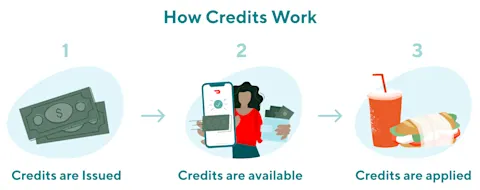
DoorDash credits are added to the account and then applied to an eligible order. Official DoorDash Help Center image. Source
Check the current timing and account steps on DoorDash’s credit and refund status page.
How to Contact DoorDash Customer Service
For a live order, start inside that order’s Help menu. The system already has the merchant, delivery, payment, and timeline attached, which is usually faster than explaining the order from the beginning.
In-app help
Select the order, tap Help, and choose the closest issue. DoorDash may show guided self-service, a credit or refund choice, chat, or access to a live agent.
DoorDash customer service phone number
The official U.S. DoorDash Help Center currently lists 855-431-0459 and states that chat and call support are available 24/7. Verify a support number through the official app or help center before calling; copied numbers on forums and social media can be wrong or fraudulent.
Use the official DoorDash customer Help Center.
Have this information ready
The email address or phone number on the account
Merchant name and approximate order time
The affected items
A short, factual description of the problem
Photos or screenshots
The refund, credit, or cancellation message already shown
Do not share the account password, full card number, verification code, or gift-card PIN with someone claiming to be support.
Is DashPass Worth It?
DashPass is DoorDash’s paid membership. DoorDash currently lists the standard U.S. price as $9.99 per month or $96 per year. Eligible orders can receive a $0 delivery fee and reduced service fees when the merchant participates and the subtotal requirement is met.
DashPass does not remove every cost. Tax, tip, menu-price differences, and other fees can remain. Look for the DashPass benefit in the checkout summary rather than assuming it applies.
Current pricing and membership details are on DoorDash’s What is DashPass? page.
DashPass may make sense when
You place several eligible delivery orders each month.
Your regular merchants carry the DashPass mark.
Your usual carts meet the required subtotal.
The savings shown on past orders exceed the membership fee.
You use member-only offers without ordering more often simply because you subscribed.
It may not make sense when
You order only once in a while.
You mostly choose pickup.
Your preferred stores are not eligible.
Your carts are usually below the minimum.
You already pay for another delivery membership.
You are likely to forget the renewal date.
A simple break-even check
Review your last three eligible orders and total the delivery and service-fee savings DashPass would have produced. If that monthly amount stays below the subscription price, the membership is not paying for itself.
DoorDash says cancellation should be completed at least 24 hours before the next scheduled payment to avoid the next charge. Benefits normally continue to the end of a paid billing period, while canceling during a free period can end benefits immediately.
See the DashPass cancellation instructions.
DoorDash FAQs
How does DoorDash work for customers?
A customer enters an address, chooses a participating merchant, builds a cart, reviews the checkout total, and pays. The merchant prepares the order and a Dasher usually delivers it. The app provides tracking and order-specific help.
Do I need DashPass to order?
No. DashPass is optional. Customers can place regular orders without a membership.
Why can DoorDash prices be higher than restaurant prices?
Marketplace prices may differ from prices offered directly by the merchant. Compare a few menu items and the complete total when cost matters.
Does a $0 delivery fee mean there are no fees?
No. A service fee, tax, tip, small-order fee, long-distance fee, or another applicable charge may remain.
Where do I enter a DoorDash promo code?
Open checkout and use the promotions, rewards, or gift-card area. The offer should appear in the price summary before the order is placed.
Why is my DoorDash promo code not working?
The most common reasons are expiration, account eligibility, location limits, an excluded merchant, a missed minimum subtotal, prior use, or a conflict with another offer.
Can I use a gift card with a promotion?
Often, yes, because redeemed gift-card value is account credit rather than a second promo. The checkout page confirms what is allowed on the order.
Can I cancel after the restaurant accepts the order?
The cancellation option may still be available, but a full refund is not guaranteed after the merchant confirms the order or a Dasher is assigned.
How do I request a DoorDash refund?
Open the affected order, choose Help, select the exact problem, and follow the prompts. Add photos when they help prove a missing, incorrect, damaged, or misplaced order.
How long does a DoorDash refund take?
A pending charge may disappear within one to three business days. A posted charge may take five to seven business days after the refund is issued, subject to bank processing.
What is the DoorDash customer service number?
The official U.S. Help Center currently lists 855-431-0459. In-app help is usually the better first step for a specific order.
Does DoorDash deliver only food?
No. Depending on the address, customers may see groceries, convenience items, retail goods, flowers, pet supplies, beauty products, and alcohol where legally allowed.
Final Takeaway
DoorDash is convenient, but the first price shown is not the number that matters. The reliable number is the amount due after item prices, fees, tax, tip, credits, and any accepted offer.
Before ordering, compare delivery with pickup, confirm the address, read the offer conditions, and make sure the discount appears in the checkout summary. For a cancellation or delivery problem, use the Help menu attached to the order and keep the confirmation.
Then check the DoorDash deals page on DealZenoHub for current saving methods and eligibility notes. Even when no public promo code is available, a pickup option, a merchant offer, account credit, or a DashPass benefit may still reduce the total.